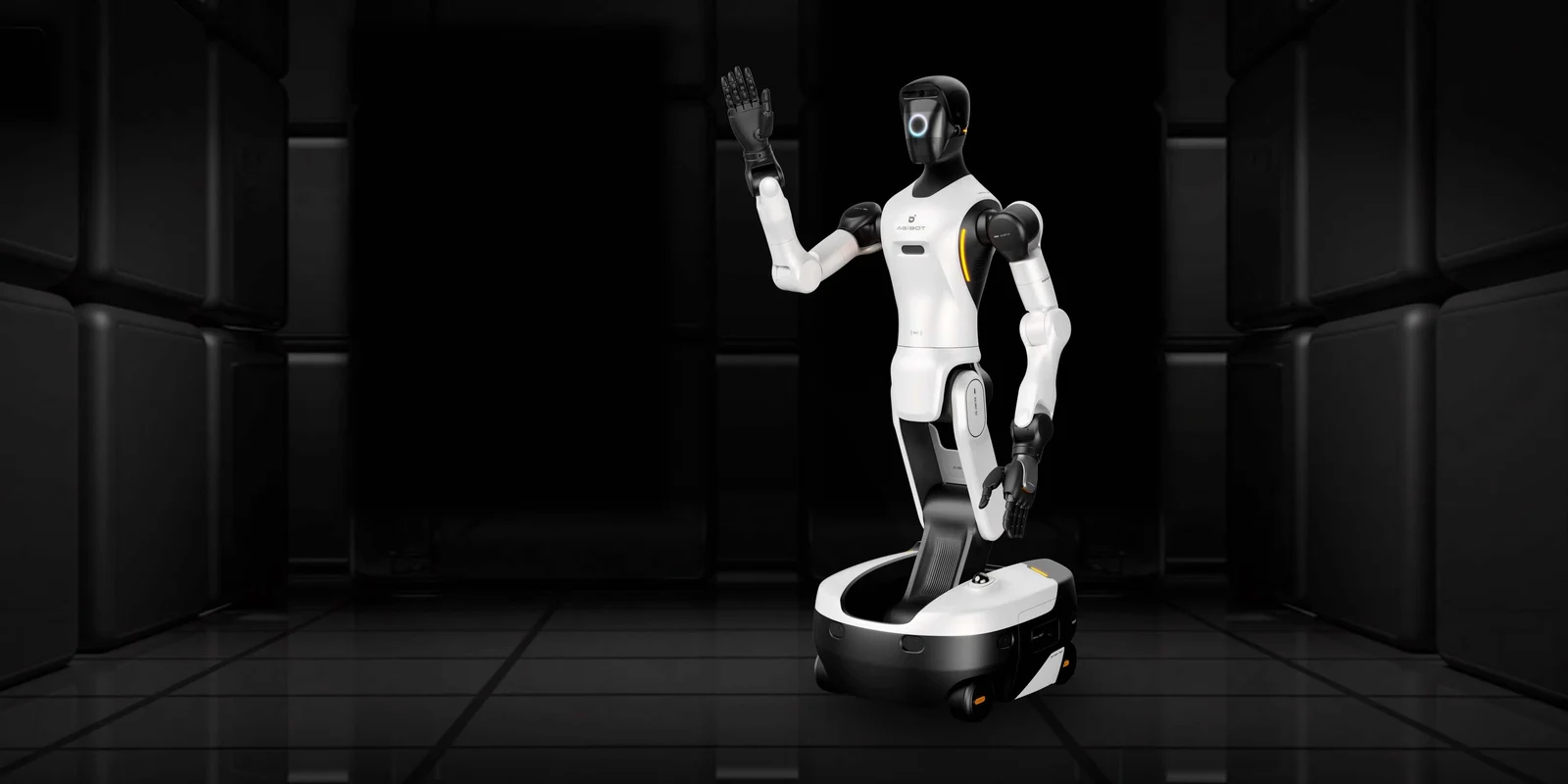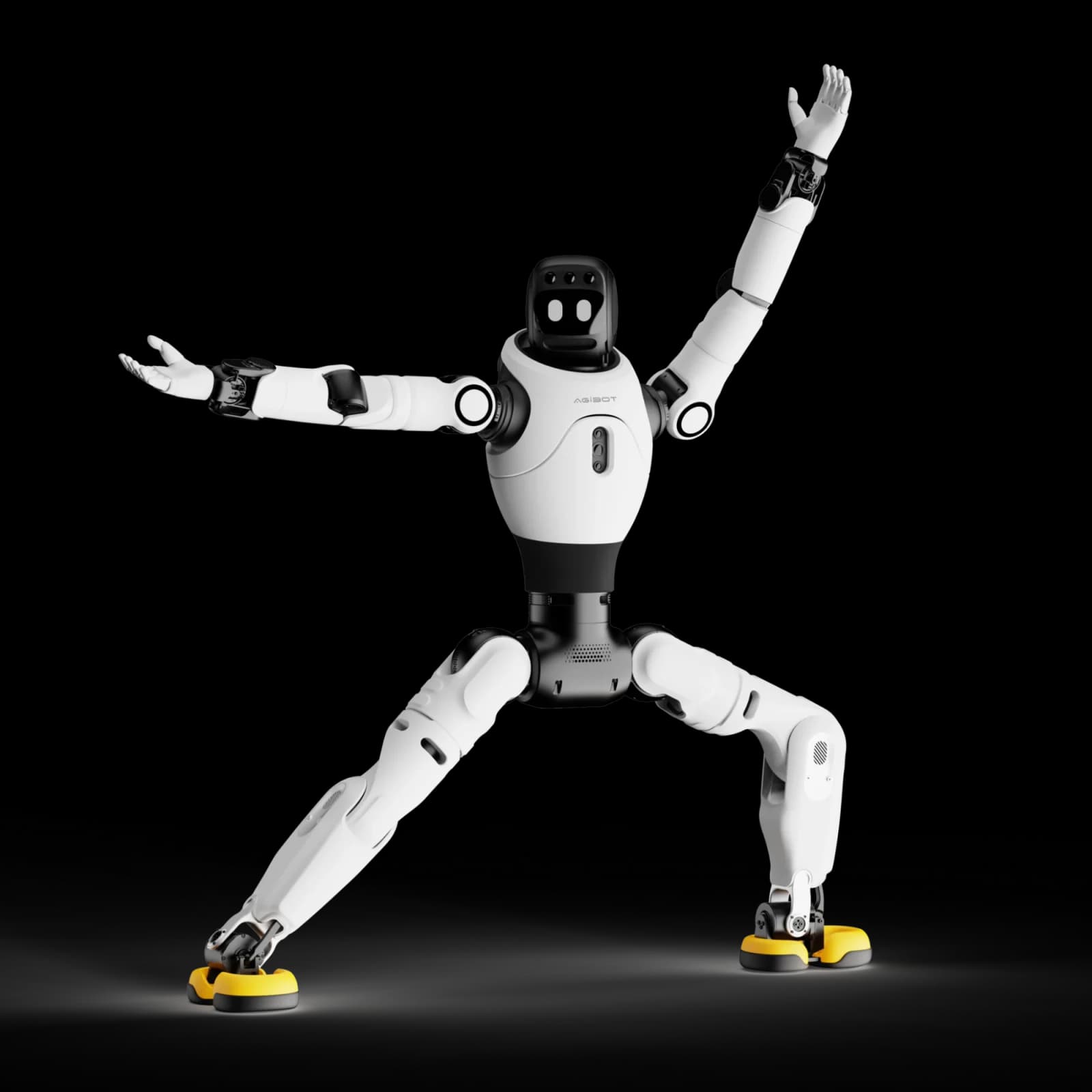
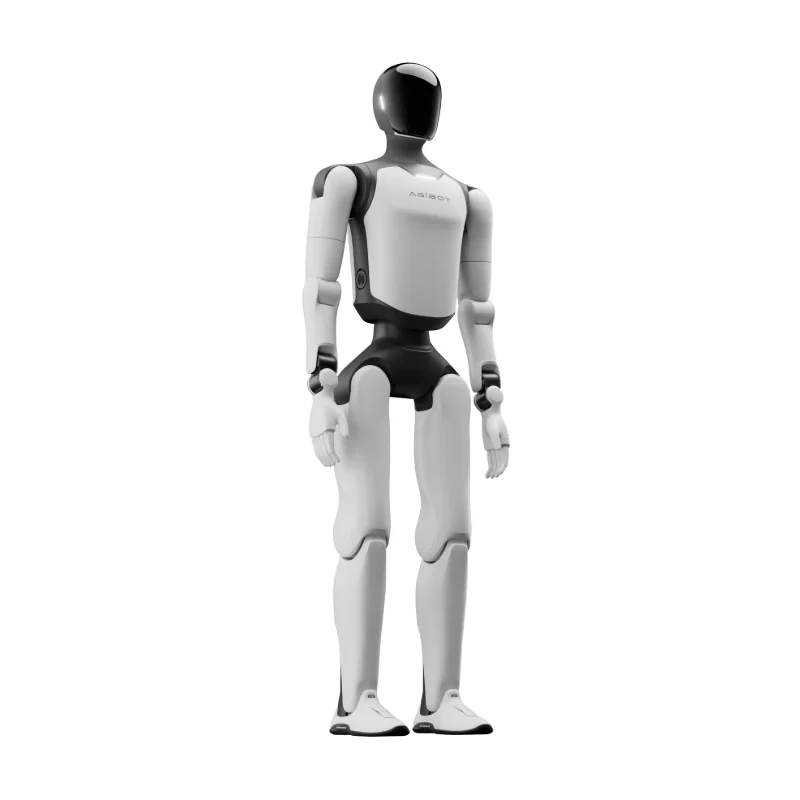
AGIBOT A3 Standard
Plan a performance and interaction project with the supplier's base A3 offering. Confirm the Standard SKU and shown hand configuration.
- Performance and interaction positioning: start with the manufacturer's stated role for base A3
- Binocular RGB perception: use the documented sensor configuration when planning interaction
- Replaceable battery system: plan battery replenishment rather than assuming uninterrupted battery endurance
For US delivery inquiries, include your state and intended use. We confirm configuration, pricing, availability and lawful supply before sending your quote or invoice.
A closer look.
Published specifications describe the cited manufacturer configuration. Your supplied configuration is confirmed in your quote.
- Dimensions (H × W × L)
- 173 × 52 × 30 cm (base A3 manual)Source
- Mass
- 55 kg (base A3)Source
- Active body degrees of freedom
- 31 excluding handsSource
- Arm payload
- 5 kg per armSource
- Compute
- RK3588 ×2Source
- System energy / endurance
- 1152 Wh; 10 hours measured at standing:walking 1:1Source
Configuration and reference notes
Standard is the supplier label for base AGIBOT A3; exact SKU mapping is pending. The manual's 31–57 DOF family range includes hand configurations, not a universal base count. Normal daily walking <1.2 m/s, maximum daily 1.8 m/s, laboratory 2.5 m/s and running 5 m/s are separate modes. The 24-hour operation statement requires battery replenishment. Standard/Ultra share reference imagery; hands and demonstrated features may differ.
Manufacturer reference tables.
Open the original parameter tables to compare documented versions. Source rows, units and conditions are retained; different versions are not merged into a promised configuration.
These are manufacturer references, not confirmation of your delivered hardware, warranty, field performance or event suitability. Final configuration and terms are agreed in your quote.
AGIBOT A3 base manual — Battery light status (working)
The supplier calls the listing Standard; the manufacturer manual names base AGIBOT A3. Exact supplier SKU remains pending. All source note blocks are retained conservatively.
Document: Release: 2026-05-08 13:41:53
Source model labels: AGIBOT A3
Source location: HTML table index 3 (zero-based), all direct source rows; header spans retained
On a small screen, swipe sideways within the table to compare columns.
| Battery Light Status (Working) | Battery Level | Status Description |
|---|---|---|
| All LEDs off | 0% | No power |
| LED1 on, LEDs 2-4 off | 1% ≤ Battery Level < 25% | Critical Low Power (Recharge Immediately) |
| LEDs 1-2 on, LEDs 3-4 off | 25% ≤ Battery Level < 50% | Low Power (Plan for Recharge) |
| LEDs 1-3 on, LED4 off | 50% ≤ Battery Level < 75% | Sufficient power |
| LEDs 1-4 on | 75% ≤ Battery Level < 100% | Full power |
Manufacturer conditions and footnotes
- Note: When using battery power, closely monitor the battery level . Low or nearly depleted batteries may cause the robot to topple suddenly due to insufficient power. Recharge or replace the battery immediately when only one indicator remains to maintain stable operation and avoid injury.
- Note: Joint Limits are calculated based on structural design parameters. Individual differences may exist between devices, and these data are for reference only.
- * measured with standing / walking ratio = 1:1.
- * Battery life measurement is affected by walking speed and load.
- Note: This activation step is only required when opening the package for the first time or when the battery pack is in storage and transportation mode.
- Note:
- Note: • Ensure no obstacles are present in front of the packaging box. • Lock all casters of the box securely. • Make sure the robot’s hip position is above the red line; adjust it manually if not. • After the robot stands up, move the packaging box at least 0.5 meters away before operation.
- Note: If the battery pack is in storage and transportation mode, it is necessary to activate the battery pack before powering on. The operation method is to short press and then long press the power button on the battery pack, until all the battery pack indicator lights light up sequentially.
- Note: • When moving the packing box to align with the robot, be sure not to hit the robot; • Before the robot enters the packaging, confirm that all casters have been locked.
- Caution: Ensure a 1-meter radius safety space around the robot to avoid collisions.
- Note: If the battery pack is in storage and transportation mode, it is necessary to activate the battery pack before powering on. The operation method is to short press and then long press the battery pack power button until all the battery pack indicator lights light up sequentially.
- * Individual battery can be removed in both the shutdown state and the powered-on standing state (when only a single battery is left in place, the robot is restricted from moving)
- Note: Dances need to be confirmed and executed according to pop-up instructions. Follow the tips to ensure safety.
Manufacturer context for this reference
2.2 Product Introduction The AGIBOT A3 series products feature 31 to 57 degrees of freedom (varies by model and configuration), enabling flexible movement and high-precision posture control. The following details the specific configuration and functions of the AGIBOT A3. • The AGIBOT A3 has a total of 31 active degrees of freedom (excluding hands), with 2 in the neck, 7 per arm, 3 in the waist, and 6 per leg. It is equipped with silicone hands and silicone fists. • The perception system is equipped with RGB stereo cameras, GPS, UWB positioning, and shoulder touch sensors. • The communication system is equipped with Wi-Fi, 4G/5G mobile network, and Bluetooth. • The interaction system is equipped with omnidirectional microphones, speakers, a curved display, and omnidirectional indicator lights. • The power system is equipped with a 1152Wh battery, providing a total battery life of 10 hours, including 6 hours of standing operation and over 4 hours of continuous walking. It supports both charging and battery changing modes, with a charging time of ≤2 hours. 2.2.1 Component Names and Description 2.2.2 Battery Indicator 2.2.2.1 Location of Battery Indicator Lights 2.2.2.2 Indicator Status Description (Working) 2.2.2.3 Indicator Status Description (Charging) 2.2.3 User Debugging Interfaces
Manufacturer reference only. This table does not establish the delivered configuration, inclusions, certification, warranty, field performance or event suitability. Preserve source conditions and footnotes when displaying it.
Open manufacturer sourceAGIBOT A3 base manual — Battery light status (charging)
The supplier calls the listing Standard; the manufacturer manual names base AGIBOT A3. Exact supplier SKU remains pending. All source note blocks are retained conservatively.
Document: Release: 2026-05-08 13:41:53
Source model labels: AGIBOT A3
Source location: HTML table index 4 (zero-based), all direct source rows; header spans retained
On a small screen, swipe sideways within the table to compare columns.
| Battery Light Status (Charging) | Battery Level | Status Description |
|---|---|---|
| LED1 breathing, LEDs 2-4 off | Battery Level < 25% | Critical Low Power |
| LED1 on, LED2 breathing, LEDs 3-4 off | 25% ≤ Battery Level < 50% | Low Power: Do not disconnect |
| LEDs 1-2 on, LED3 breathing, LED4 off | 50% ≤ Battery Level < 75% | Medium Power: Operable; charge to full recommended |
| LEDs 1-3 on, LED4 breathing | 75% ≤ Battery Level < 100% | Sufficient Power |
| LEDs 1-4 on | Battery Level = 100% | Charging Complete |
Manufacturer conditions and footnotes
- Note: When using battery power, closely monitor the battery level . Low or nearly depleted batteries may cause the robot to topple suddenly due to insufficient power. Recharge or replace the battery immediately when only one indicator remains to maintain stable operation and avoid injury.
- Note: Joint Limits are calculated based on structural design parameters. Individual differences may exist between devices, and these data are for reference only.
- * measured with standing / walking ratio = 1:1.
- * Battery life measurement is affected by walking speed and load.
- Note: This activation step is only required when opening the package for the first time or when the battery pack is in storage and transportation mode.
- Note:
- Note: • Ensure no obstacles are present in front of the packaging box. • Lock all casters of the box securely. • Make sure the robot’s hip position is above the red line; adjust it manually if not. • After the robot stands up, move the packaging box at least 0.5 meters away before operation.
- Note: If the battery pack is in storage and transportation mode, it is necessary to activate the battery pack before powering on. The operation method is to short press and then long press the power button on the battery pack, until all the battery pack indicator lights light up sequentially.
- Note: • When moving the packing box to align with the robot, be sure not to hit the robot; • Before the robot enters the packaging, confirm that all casters have been locked.
- Caution: Ensure a 1-meter radius safety space around the robot to avoid collisions.
- Note: If the battery pack is in storage and transportation mode, it is necessary to activate the battery pack before powering on. The operation method is to short press and then long press the battery pack power button until all the battery pack indicator lights light up sequentially.
- * Individual battery can be removed in both the shutdown state and the powered-on standing state (when only a single battery is left in place, the robot is restricted from moving)
- Note: Dances need to be confirmed and executed according to pop-up instructions. Follow the tips to ensure safety.
Manufacturer context for this reference
2.2 Product Introduction The AGIBOT A3 series products feature 31 to 57 degrees of freedom (varies by model and configuration), enabling flexible movement and high-precision posture control. The following details the specific configuration and functions of the AGIBOT A3. • The AGIBOT A3 has a total of 31 active degrees of freedom (excluding hands), with 2 in the neck, 7 per arm, 3 in the waist, and 6 per leg. It is equipped with silicone hands and silicone fists. • The perception system is equipped with RGB stereo cameras, GPS, UWB positioning, and shoulder touch sensors. • The communication system is equipped with Wi-Fi, 4G/5G mobile network, and Bluetooth. • The interaction system is equipped with omnidirectional microphones, speakers, a curved display, and omnidirectional indicator lights. • The power system is equipped with a 1152Wh battery, providing a total battery life of 10 hours, including 6 hours of standing operation and over 4 hours of continuous walking. It supports both charging and battery changing modes, with a charging time of ≤2 hours. 2.2.1 Component Names and Description 2.2.2 Battery Indicator 2.2.2.1 Location of Battery Indicator Lights 2.2.2.2 Indicator Status Description (Working) 2.2.2.3 Indicator Status Description (Charging) 2.2.3 User Debugging Interfaces
Manufacturer reference only. This table does not establish the delivered configuration, inclusions, certification, warranty, field performance or event suitability. Preserve source conditions and footnotes when displaying it.
Open manufacturer sourceAGIBOT A3 base manual — Hardware expansion interfaces
The supplier calls the listing Standard; the manufacturer manual names base AGIBOT A3. Exact supplier SKU remains pending. All source note blocks are retained conservatively.
Document: Release: 2026-05-08 13:41:53
Source model labels: AGIBOT A3
Source location: HTML table index 5 (zero-based), all direct source rows; header spans retained
On a small screen, swipe sideways within the table to compare columns.
| No. | Hardware Expansion Interface | Interface Type | Interface Description |
|---|---|---|---|
| 1 | Maintenance Port - Waist : For debugging and Further development | USB Type-A 2.0 | • Supports debugging and development of the torso MDU (RK3588) |
| 2 | Maintenance Port - Head : For debugging and Further development | USB Type-C | • Supports debugging and development of the head HDU (RK3588) • Supports connection of microphone receiver |
| 3 | Power Interface | USB Type-C | • Supports 5V/3A output, and charging external devices (i.e. Remote Control) |
Manufacturer conditions and footnotes
- Note: When using battery power, closely monitor the battery level . Low or nearly depleted batteries may cause the robot to topple suddenly due to insufficient power. Recharge or replace the battery immediately when only one indicator remains to maintain stable operation and avoid injury.
- Note: Joint Limits are calculated based on structural design parameters. Individual differences may exist between devices, and these data are for reference only.
- * measured with standing / walking ratio = 1:1.
- * Battery life measurement is affected by walking speed and load.
- Note: This activation step is only required when opening the package for the first time or when the battery pack is in storage and transportation mode.
- Note:
- Note: • Ensure no obstacles are present in front of the packaging box. • Lock all casters of the box securely. • Make sure the robot’s hip position is above the red line; adjust it manually if not. • After the robot stands up, move the packaging box at least 0.5 meters away before operation.
- Note: If the battery pack is in storage and transportation mode, it is necessary to activate the battery pack before powering on. The operation method is to short press and then long press the power button on the battery pack, until all the battery pack indicator lights light up sequentially.
- Note: • When moving the packing box to align with the robot, be sure not to hit the robot; • Before the robot enters the packaging, confirm that all casters have been locked.
- Caution: Ensure a 1-meter radius safety space around the robot to avoid collisions.
- Note: If the battery pack is in storage and transportation mode, it is necessary to activate the battery pack before powering on. The operation method is to short press and then long press the battery pack power button until all the battery pack indicator lights light up sequentially.
- * Individual battery can be removed in both the shutdown state and the powered-on standing state (when only a single battery is left in place, the robot is restricted from moving)
- Note: Dances need to be confirmed and executed according to pop-up instructions. Follow the tips to ensure safety.
Manufacturer context for this reference
2.2 Product Introduction The AGIBOT A3 series products feature 31 to 57 degrees of freedom (varies by model and configuration), enabling flexible movement and high-precision posture control. The following details the specific configuration and functions of the AGIBOT A3. • The AGIBOT A3 has a total of 31 active degrees of freedom (excluding hands), with 2 in the neck, 7 per arm, 3 in the waist, and 6 per leg. It is equipped with silicone hands and silicone fists. • The perception system is equipped with RGB stereo cameras, GPS, UWB positioning, and shoulder touch sensors. • The communication system is equipped with Wi-Fi, 4G/5G mobile network, and Bluetooth. • The interaction system is equipped with omnidirectional microphones, speakers, a curved display, and omnidirectional indicator lights. • The power system is equipped with a 1152Wh battery, providing a total battery life of 10 hours, including 6 hours of standing operation and over 4 hours of continuous walking. It supports both charging and battery changing modes, with a charging time of ≤2 hours. 2.2.1 Component Names and Description 2.2.2 Battery Indicator 2.2.2.1 Location of Battery Indicator Lights 2.2.2.2 Indicator Status Description (Working) 2.2.2.3 Indicator Status Description (Charging) 2.2.3 User Debugging Interfaces
Manufacturer reference only. This table does not establish the delivered configuration, inclusions, certification, warranty, field performance or event suitability. Preserve source conditions and footnotes when displaying it.
Open manufacturer sourceAGIBOT A3 base manual — Joint limits
The supplier calls the listing Standard; the manufacturer manual names base AGIBOT A3. Exact supplier SKU remains pending. All source note blocks are retained conservatively.
Document: Release: 2026-05-08 13:41:53
Source model labels: AGIBOT A3
Source location: HTML table index 6 (zero-based), all direct source rows; header spans retained
On a small screen, swipe sideways within the table to compare columns.
| Joint Name | Joint Limit | Joint Name | Joint Limit |
|---|---|---|---|
| Arm | J1 (Shoulder pitch): -170° to 170° | Waist | J1 (Waist roll): ±20° |
| J2 (Shoulder roll): -91° to 91° | J2 (Waist yaw): ±150° | ||
| J3 (Shoulder yaw): ±160° | J3 (Waist pitch): ±30° | ||
| J4 (Elbow pitch): -60° to 140° | Leg | J1 (Hip pitch): -168° to 154° | |
| J5 (Wrist yaw): ±160° | J2 (Hip roll): -60° to 100° | ||
| J6 (Wrist pitch): ±93° | J3 (Hip yaw): ±158° | ||
| J7 (Wrist roll): ±33° | J4 (Knee pitch): -10° to 148° | ||
| Head | Tilt joint (Head pitch): 15° (down), 25° (up) | J5 (Ankle pitch): -52° to 30° | |
| Rotation joint (Head yaw): ±90° | J6 (Ankle roll): ±20° |
Manufacturer conditions and footnotes
- Note: When using battery power, closely monitor the battery level . Low or nearly depleted batteries may cause the robot to topple suddenly due to insufficient power. Recharge or replace the battery immediately when only one indicator remains to maintain stable operation and avoid injury.
- Note: Joint Limits are calculated based on structural design parameters. Individual differences may exist between devices, and these data are for reference only.
- * measured with standing / walking ratio = 1:1.
- * Battery life measurement is affected by walking speed and load.
- Note: This activation step is only required when opening the package for the first time or when the battery pack is in storage and transportation mode.
- Note:
- Note: • Ensure no obstacles are present in front of the packaging box. • Lock all casters of the box securely. • Make sure the robot’s hip position is above the red line; adjust it manually if not. • After the robot stands up, move the packaging box at least 0.5 meters away before operation.
- Note: If the battery pack is in storage and transportation mode, it is necessary to activate the battery pack before powering on. The operation method is to short press and then long press the power button on the battery pack, until all the battery pack indicator lights light up sequentially.
- Note: • When moving the packing box to align with the robot, be sure not to hit the robot; • Before the robot enters the packaging, confirm that all casters have been locked.
- Caution: Ensure a 1-meter radius safety space around the robot to avoid collisions.
- Note: If the battery pack is in storage and transportation mode, it is necessary to activate the battery pack before powering on. The operation method is to short press and then long press the battery pack power button until all the battery pack indicator lights light up sequentially.
- * Individual battery can be removed in both the shutdown state and the powered-on standing state (when only a single battery is left in place, the robot is restricted from moving)
- Note: Dances need to be confirmed and executed according to pop-up instructions. Follow the tips to ensure safety.
Manufacturer context for this reference
2.3 Robot Joint Motion Range Note: Joint Limits are calculated based on structural design parameters. Individual differences may exist between devices, and these data are for reference only.
Manufacturer reference only. This table does not establish the delivered configuration, inclusions, certification, warranty, field performance or event suitability. Preserve source conditions and footnotes when displaying it.
Open manufacturer sourceAGIBOT A3 base manual — Robot configuration and capability
The supplier calls the listing Standard; the manufacturer manual names base AGIBOT A3. Exact supplier SKU remains pending. All source note blocks are retained conservatively.
Document: Release: 2026-05-08 13:41:53
Source model labels: AGIBOT A3
Source location: HTML table index 7 (zero-based), all direct source rows; header spans retained
On a small screen, swipe sideways within the table to compare columns.
| Robot Model | Configuration | Capability |
|---|---|---|
| AGIBOT A3 | Interactive Binocular Camera | Interactive Binocular Camera: Supports visual recognition and response in human-robot interaction scenarios |
Manufacturer conditions and footnotes
- Note: When using battery power, closely monitor the battery level . Low or nearly depleted batteries may cause the robot to topple suddenly due to insufficient power. Recharge or replace the battery immediately when only one indicator remains to maintain stable operation and avoid injury.
- Note: Joint Limits are calculated based on structural design parameters. Individual differences may exist between devices, and these data are for reference only.
- * measured with standing / walking ratio = 1:1.
- * Battery life measurement is affected by walking speed and load.
- Note: This activation step is only required when opening the package for the first time or when the battery pack is in storage and transportation mode.
- Note:
- Note: • Ensure no obstacles are present in front of the packaging box. • Lock all casters of the box securely. • Make sure the robot’s hip position is above the red line; adjust it manually if not. • After the robot stands up, move the packaging box at least 0.5 meters away before operation.
- Note: If the battery pack is in storage and transportation mode, it is necessary to activate the battery pack before powering on. The operation method is to short press and then long press the power button on the battery pack, until all the battery pack indicator lights light up sequentially.
- Note: • When moving the packing box to align with the robot, be sure not to hit the robot; • Before the robot enters the packaging, confirm that all casters have been locked.
- Caution: Ensure a 1-meter radius safety space around the robot to avoid collisions.
- Note: If the battery pack is in storage and transportation mode, it is necessary to activate the battery pack before powering on. The operation method is to short press and then long press the battery pack power button until all the battery pack indicator lights light up sequentially.
- * Individual battery can be removed in both the shutdown state and the powered-on standing state (when only a single battery is left in place, the robot is restricted from moving)
- Note: Dances need to be confirmed and executed according to pop-up instructions. Follow the tips to ensure safety.
Manufacturer context for this reference
2.4 Robot Sensor Field of View
Manufacturer reference only. This table does not establish the delivered configuration, inclusions, certification, warranty, field performance or event suitability. Preserve source conditions and footnotes when displaying it.
Open manufacturer sourceAGIBOT A3 base manual — Robot Specifications
The supplier calls the listing Standard; the manufacturer manual names base AGIBOT A3. Exact supplier SKU remains pending. All source note blocks are retained conservatively.
Document: Release: 2026-05-08 13:41:53
Source model labels: AGIBOT A3
Source location: HTML table index 8 (zero-based), all direct source rows; header spans retained
On a small screen, swipe sideways within the table to compare columns.
| Robot Specifications | Details | |
|---|---|---|
| Main Body | Height | 1.73 m |
| Dimensions | 173 cm (H) x 52 cm (W) x 30 cm (L) | |
| Weight | 55 KG | |
| Active Degrees of Freedom | 31 | |
| Neck Degrees of Freedom | 2 | |
| Single Arm Degrees of Freedom | 7 | |
| Waist Degrees of Freedom | 3 | |
| Single Leg Degrees of Freedom | 6 | |
| Perception System | 3D LiDAR | / |
| Embodied Operation RGB-D Camera | / | |
| Terrain Perception RGB-D Camera | / | |
| Interactive RGB Camera | RGB Binocular Camera | |
| Panoramic RGB Camera | / | |
| GPS | Equipped | |
| GPS RTK | / | |
| UWB Positioning | Equipped | |
| Shoulder Touch Sensors | Equipped | |
| Communication | Communication Methods | WiFi, 4G/5G Network, Bluetooth |
| Interaction | Microphone | Omnidirectional Microphone Front and Rear 8-Microphone Array |
| Speaker | Equipped | |
| Face Screen | Curved Screen | |
| Indicator Lights | Omnidirectional Indicator Lights | |
| Performance | Knee Joint Peak Torque | 320 N·m |
| Movement Speed | Max Daily Walking Speed: 1.8 m/s Normal Daily Walking Speed: < 1.2 m/s Maximum Laboratory Speed: 2.5 m/s Max Running Speed: 5 m/s | |
| Single Arm Payload | 5 kg | |
| Power and Energy | Battery Capacity | 1152 W·h |
| Battery Life | 10 hour * measured with standing / walking ratio = 1:1. * Battery life measurement is affected by walking speed and load. | |
| Charging Methods | Supports direct charging and battery swapping | |
| Charging Time | ≤2 hour | |
| Charging Input Voltage | 110-220 V | |
| Computing Power | Basic Computing Board | RK3588 * 2 |
| Advanced Computing Board | / | |
| Others | Wireless Remote Control | Equipped |
| OTA Update | Supported | |
| Further Development | Supported | |
Manufacturer conditions and footnotes
- Note: When using battery power, closely monitor the battery level . Low or nearly depleted batteries may cause the robot to topple suddenly due to insufficient power. Recharge or replace the battery immediately when only one indicator remains to maintain stable operation and avoid injury.
- Note: Joint Limits are calculated based on structural design parameters. Individual differences may exist between devices, and these data are for reference only.
- * measured with standing / walking ratio = 1:1.
- * Battery life measurement is affected by walking speed and load.
- Note: This activation step is only required when opening the package for the first time or when the battery pack is in storage and transportation mode.
- Note:
- Note: • Ensure no obstacles are present in front of the packaging box. • Lock all casters of the box securely. • Make sure the robot’s hip position is above the red line; adjust it manually if not. • After the robot stands up, move the packaging box at least 0.5 meters away before operation.
- Note: If the battery pack is in storage and transportation mode, it is necessary to activate the battery pack before powering on. The operation method is to short press and then long press the power button on the battery pack, until all the battery pack indicator lights light up sequentially.
- Note: • When moving the packing box to align with the robot, be sure not to hit the robot; • Before the robot enters the packaging, confirm that all casters have been locked.
- Caution: Ensure a 1-meter radius safety space around the robot to avoid collisions.
- Note: If the battery pack is in storage and transportation mode, it is necessary to activate the battery pack before powering on. The operation method is to short press and then long press the battery pack power button until all the battery pack indicator lights light up sequentially.
- * Individual battery can be removed in both the shutdown state and the powered-on standing state (when only a single battery is left in place, the robot is restricted from moving)
- Note: Dances need to be confirmed and executed according to pop-up instructions. Follow the tips to ensure safety.
Manufacturer context for this reference
2.5 Robot Specifications
Manufacturer reference only. This table does not establish the delivered configuration, inclusions, certification, warranty, field performance or event suitability. Preserve source conditions and footnotes when displaying it.
Open manufacturer sourceBase AGIBOT A3 product-page parameters
Document:
Source model labels: AGIBOT A3
Source location: .A3_One .box2 .item; all nine parameter cards
Source qualifications
- Maximum Endurance is a manufacturer headline; use the manual test condition and replenishment caveats. Packaging/fleet claims require supplied-configuration confirmation.
| Height | 173 cm |
|---|---|
| Weight | 55 kg |
| Maximum Endurance | 10 h |
| Power-to-Weight Ratio | 0.218 kW/kg (industry-leading, delivering exceptional burst performance) |
| Battery | Dual battery packs · 1152 Wh · Full-tab cells |
| Positioning | Standard UWB, single-unit accuracy <±10 cm |
| Fleet Control | Supports precise coordination of 100+ units |
| Network | Dual-module 5G with dual-SIM support |
| Packaging | Autonomous case loading and unloading; deployable by a single operator |
Manufacturer reference only. This table does not establish the delivered configuration, inclusions, certification, warranty, field performance or event suitability. Preserve source conditions and footnotes when displaying it.
Open manufacturer sourceBrochure — A3 — complete Specifications grid
Document: AGIBOT-Product-Brochure-20260722.pdf
Source model labels: A3
Source location: physical PDF page 3
Source qualifications
- The brochure uses Positioning as the label for both UWB and packaging/deployment cards. Both original labels are retained; the second is not renamed Packaging.
| Height | 173 cm |
|---|---|
| Weight | 55 kg |
| Endurance | 10 h |
| Power-to-Weight Ratio | 0.218 kW/kg (industry-leading, delivering exceptional burst performance) |
| Battery | Dual battery packs · 1152 Wh · Full-tab cells |
| Positioning | Standard UWB, single-unit accuracy <±10 cm |
| Fleet Control | Supports precise coordination of 100+ units |
| Network | Dual-module 5G with dual-SIM support |
| Positioning | Autonomous case loading and unloading; deployable by a single operator |
Manufacturer reference only. This table does not establish the delivered configuration, inclusions, certification, warranty, field performance or event suitability. Preserve source conditions and footnotes when displaying it.
Open manufacturer source — page 3From the right configuration to a clear quote.
Tell us your model, intended use and timeline. We review the accessories and delivery requirements with you, then send a quote or invoice for the agreed configuration.
Start an inquiry- Share your requirements
Model, intended use and timeline.
- Review the configuration
Accessories, compatibility and delivery.
- Receive your quote
Agreed scope before a quote or invoice.