Venue readiness for a live robot activation
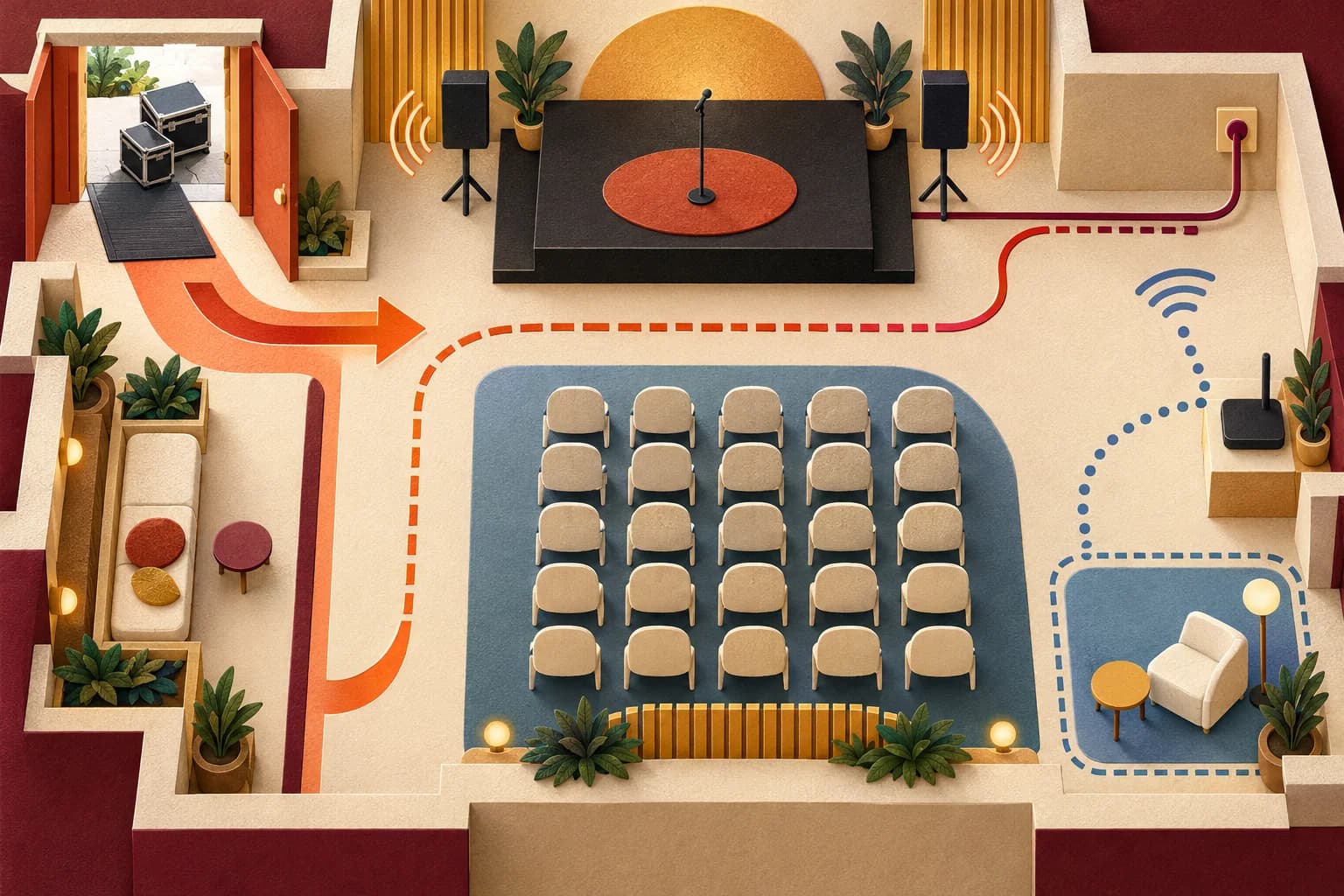
Schedule a walkthrough with the venue and robot operator while there is still time to change the layout. A floor plan alone cannot answer every question about access, surface, sound, cable routes, connectivity, and load-in. Walk the proposed route, record what you can verify, and assign each open item to the person who can resolve it.
Schedule a real walkthrough
Invite the event producer, venue contact, robot operator, and relevant technical or accessibility staff. Bring the schedule, floor plan, current robot instructions, and open questions. Walk the actual rooms, doors, elevators, loading path, and event setup. If the setup will change, name who will report it and when the team will recheck.
Walk from vehicle or dock to storage, preparation area, operating position, and back. Note doors that may be locked, lift access, floor transitions, competing event traffic, and where equipment can wait without obstructing venue operations. Record decisions separately from assumptions. “Venue will confirm access window” is a useful open item; “load-in should be fine” is not.
CDC mass-gathering guidance discusses crowding, exits, and the way event context can affect planning. Use it as a lens for asking how the event’s scale and conditions affect a route; it does not mean every activation meets the CDC’s mass-gathering description. CDC Yellow Book, Mass Gatherings
Access and viewing
Trace a guest route from arrival to viewing and exit. Include guests using mobility devices, seated viewing, companions, and people who prefer not to approach. Plan a way to observe and leave without crossing the operating area. Check whether signs, displays, cameras, or a queue could block circulation or visibility.
Consider the experience beyond physical entry. Is the explanation available in a format guests can understand? Can someone hear it over the room sound or read the key information? Can a guest decline interaction without being singled out? Identify the person who can review access questions with the venue. DOJ guidance on temporary events and the 2010 ADA Standards can inform layout questions, including provisions for assembly areas where applicable; neither source lets this checklist determine whether a particular event complies. DOJ ADA Guide for Small Towns and 2010 ADA Standards
Movement area and surface
Mark the operating area, guest viewing area, operator position, and any route the robot may take. Walk the surface and note thresholds, ramps, loose materials, floor coverings, and nearby objects. Confirm conditions in the current model-specific instructions; do not assume a robot can cross a surface because a person or another model can.
Check the scene at the time the activation will run. Daylight, event lighting, sound checks, neighboring activity, and changing furniture can affect what the operator sees and what guests do. A different room setup or a last-minute route change should trigger a fresh review by the responsible operator and venue contact.
Power, cable routes, and sound
List each item that needs power, its location, and who will provide and inspect the connection. Draw cable routes on the plan and ask the venue how they should be protected or kept out of travel paths. Do not select adapters, circuits, covers, or installation methods by guesswork. OSHA’s electrical standard addresses specific equipment and installations, including fairs and exhibitions; it is not a substitute for the venue’s technical direction or qualified electrical review. OSHA 1910.306
Ask how the demonstration’s audio, announcements, and neighboring sound interact. Identify what the operator needs to hear and what guests need to understand. Agree on a cue that remains clear if the room is noisy, and a non-audio backup if the planned signal is missed.
Connectivity and load-in
Confirm whether the planned demonstration depends on a network, app, remote interface, or offline function. Ask what the exact setup requires and who can authorize access to venue networks. Do not assume public Wi-Fi is available, permitted, or adequate. If the robot can operate only under conditions set by its manufacturer or supplier, document those conditions and test them in the intended area.
Confirm delivery windows, credentials, staging, elevator or dock procedures, storage, and a contact for delays. Follow transport and storage conditions in the current model instructions. Unitree G1 materials and Boston Dynamics Spot manuals apply to those systems, not as general event requirements. Unitree G1 resources · Spot safety and operations manuals
Confirm the fallback
Write a decision tree in plain language. If the route is unavailable, pause and ask the venue contact and operator to approve a revised plan. If the required connection or cue is unavailable, use the agreed stationary or staff-led alternative. If no approved alternative fits the event, cancel that segment and tell the producer. Name who makes each decision and how guests will be updated.
Close the walkthrough by reading back owners and deadlines. Recheck the room after the final setup, then compare it with the approved plan. A changed cable route, blocked exit, new obstruction, or different operating area needs review before the demonstration begins. The checklist is most useful when it records a decision, an owner, and a point for rechecking.
Method and limits
This checklist organizes venue questions for a specific event and robot configuration. ADA references support planning prompts, and OSHA’s cited rule applies to electrical requirements within its scope; neither is a compliance determination. Refer layout, access, electrical, connectivity, and operating specifics to the venue and qualified personnel. These materials do not certify legal, accessibility, or safety compliance and do not predict outcomes.
Sources
- CDC Yellow Book, “Mass Gatherings”: https://www.cdc.gov/yellow-book/hcp/travel-for-work-other/mass-gatherings.html
- U.S. Department of Justice, “ADA Guide for Small Towns”: https://archive.ada.gov/smtown.htm
- ADA.gov, “2010 ADA Standards for Accessible Design”: https://www.ada.gov/law-and-regs/design-standards/2010-stds/
- OSHA, “1910.306 — Specific purpose equipment and installations”: https://www.osha.gov/laws-regs/regulations/standardnumber/1910/1910.306
- Unitree Robotics, “Unitree Explore APP Download” (G1 manual section): https://www.unitree.com/app/g1/
- Boston Dynamics Support Center, “Spot safety and operations manuals”: https://support.bostondynamics.com/s/article/spot-safety-and-operations-manuals